Why Good Content Still Doesn't Rank: A Technical SEO Checklist for Crawlability, Indexing, and Core Web Vitals
A content team ships a redesign, publishes forty new landing pages, and watches the organic forecast miss by half. Nobody can point to a bad headline or a thin paragraph, because the writing is fine. The actual fault usually sits upstream of the words entirely: a page that never got crawled on schedule, an indexed duplicate that stole the canonical, or a template that loads with a Largest Contentful Paint past four seconds on the mid-range phone most of the audience is actually holding.
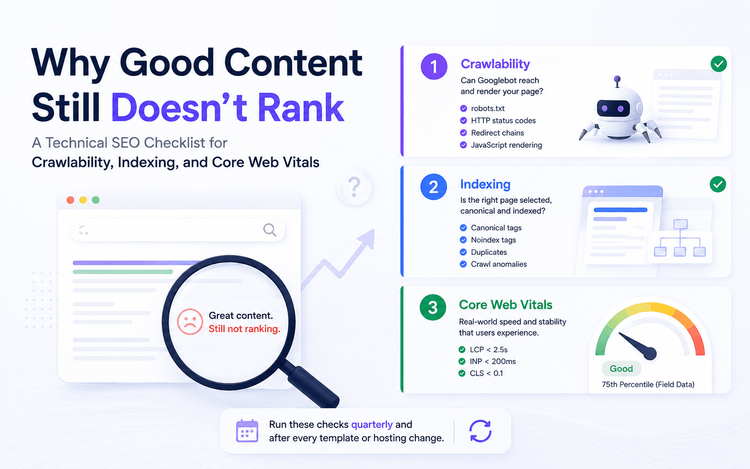
Technical SEO is the set of checks that decide whether a page can be reached, understood and kept in the index in a form search engines are willing to rank - before a single sentence of the copy is judged on its merits. It resolves into three layers that fail independently and silently: crawlability, which is whether a crawler can reach and fetch a URL at all; indexing, which is whether that URL earns a place in the index and under which canonical; and Core Web Vitals, which is whether the experience it delivers to real visitors is fast and stable enough to keep. A page can pass any one of these and still fail the other two without a single alarm going off on a rank tracker.
This checklist is written for whoever actually owns that technical health - an in-house SEO lead, a marketing ops manager, a developer inheriting an SEO backlog - and it is built to be run against two things you already have: Google Search Console and PageSpeed Insights. It is not a one-time audit binder. Adviora's Technical SEO Intelligence module exists to make this exact checklist continuous rather than a once-a-quarter fire drill.
Why Crawlability, Indexing, and Core Web Vitals Still Decide Whether You Get Found
It matters because these three layers sit underneath every ranking factor you actually optimise for. A brilliant piece of content that Googlebot cannot reach is invisible; one that is indexed under the wrong canonical is competing against its own duplicate; one that loads slowly for real users is being judged against a page experience bar its content quality alone cannot clear. None of this shows up as a red flag on a keyword rank tracker, because rank tracking assumes the page is already crawled, indexed under the URL you're tracking, and being served the way you built it - which is exactly the assumption a technical fault breaks first.
- Publishing outpaces crawling. Sites that ship content faster than Google's crawl demand accounts for build up a backlog of undiscovered or stale URLs, and the newest pages are usually the ones waiting longest. [STAT NEEDED: share of newly published URLs still showing "Discovered – currently not indexed" after 30 days, by site size]
- Indexing is never guaranteed. Google is explicit that being crawled does not mean being indexed; a page can be fetched successfully and still sit in "Crawled - currently not indexed" indefinitely.
- Lab tests measure your office Wi-Fi, not your audience. A page can score well on a fast connection in a controlled test and still fail Core Web Vitals for real users on a mid-range Android device on mobile data.
- One template failure suppresses an entire section. Core Web Vitals are reported, and usually diagnosed, by URL group, so a single slow component in a shared header or footer can fail dozens of pages at once.
The right response isn't a one-off audit deck that gets filed away after a redesign. It's a checklist you run on a schedule against Search Console and the Chrome UX Report, which is what Adviora's Technical SEO Intelligence module is built to keep current automatically.
The Three Gates: How a Page Actually Gets From Your Server Into a Result
There is no single "SEO score" Google calculates. Getting a URL into search results is a pipeline with three sequential gates, and Google's own documentation on JavaScript indexing describes the middle two explicitly: crawling, rendering and indexing happen as separate phases, each of which a page can fail on its own terms.
- Gate one, crawling. Googlebot has to be permitted by robots.txt, receive a healthy HTTP response, and reach the URL through a link or a sitemap - a redirect chain, a server timeout or a blanket Disallow rule stops it here before content is ever read.
- Gate two, rendering and indexing. Pages that return a 200 status enter a rendering queue where a headless Chromium executes the JavaScript; if the primary content isn't present in that rendered HTML - hidden behind a client-side route with no server fallback, for instance - it doesn't reach the index.
- Gate three, ranking eligibility. Once indexed, Core Web Vitals and the rest of Google's page experience signals are used by ranking systems alongside relevance - Google states plainly that good Core Web Vitals don't guarantee a top ranking, but a poor score competes at a disadvantage when relevance is otherwise tied.
Each gate produces its own failure mode and its own report. Confusing a rendering problem for a ranking problem, or a crawling problem for a content problem, is the single most common reason technical SEO fixes target the wrong layer.
A Perfect Lighthouse Score Is Not the Same Claim as Passing Core Web Vitals
Teams that run one Lighthouse test in Chrome DevTools and call Core Web Vitals "done" are answering the wrong question. Lighthouse and PageSpeed Insights' lab section simulate a single page load under fixed network and device conditions. That's useful for debugging a specific problem, and it is not the number Google's ranking systems read.
- Lab data is one simulated session. It's reproducible and great for isolating a regression, but it says nothing about what actually happened to a real visitor.
- Field data is the Chrome UX Report - real Chrome users, aggregated at the 75th percentile of visits over a rolling reporting window. This is the dataset behind the Core Web Vitals report in Search Console and the "field data" section of PageSpeed Insights.
- A page can score 100 in the lab and still fail INP in the field, if real visitors are on mid-range hardware behind a chatty third-party script the lab run never loaded.
- Low-traffic pages often carry no page-level CrUX data at all; Google falls back to origin-level aggregation, which can quietly average away a template-level problem on your highest-value pages.
Treat the lab score as a diagnostic tool for finding the cause, and the field data as the only scoreboard that counts toward the actual signal.
The Honest Diagnostic: Reading Search Console's Three Reports Together
Search Console already gives you the diagnostic; most teams just read one report at a time instead of the pattern across all three. Page Indexing tells you what happened to a URL. Crawl Stats tells you whether Google could reach your server efficiently while it tried. The Core Web Vitals report tells you what real visitors experienced once a page loaded. Read together, they point at a specific fix instead of a vague sense that "something is wrong."
- "Crawled - currently not indexed" at scale, paired with "Duplicate without user-selected canonical" → consolidate near-duplicate URLs onto one canonical instead of asking Google to pick a favourite among them.
- "Discovered - currently not indexed" rising across a whole section → check Crawl Stats for host status; a stretch of 5xx responses or slow response times lowers Google's crawl capacity limit for your whole site, not just the affected pages. [STAT NEEDED: average share of crawl budget spent on duplicate or parameterized URLs across mid-size sites]
- Core Web Vitals "Poor" applied to an entire URL group rather than one page → a template-level problem in a shared component, not a one-off; fix it once at the template and every URL in the group should move together.
- A page excluded by a noindex tag or a robots.txt rule nobody remembers writing → check for a staging flag or a CMS default left on after a migration; this is the single most common accidental de-indexing cause.
Run this comparison over a quarter, not a week - daily Search Console data is genuinely noisy - and always segment by URL pattern or template rather than reading the site-wide total, because a stable overall number can hide one broken section.
Run the Checklist: A Working Audit for Crawlability, Indexing, and Core Web Vitals
This is the sequence, in the order that actually matters - each step depends on the one before it being clean, so don't jump ahead to Core Web Vitals if crawling is still broken.
- Confirm host status is Green in Search Console's Crawl Stats report first. A red status - repeated timeouts, DNS failures or 5xx responses - invalidates every other reading until it's fixed.
- Audit robots.txt line by line, especially after any migration or staging-to-production cutover. A single leftover Disallow: / is the most common self-inflicted crawlability failure.
- Open the Page Indexing report and segment the exclusion reasons by URL pattern, not just the total count. A spike in one template tells you exactly where to look.
- Resolve canonical conflicts directly. Where the report shows "Duplicate, Google chose different canonical than user", treat it as a signal that your own canonicalisation hints - redirects, sitemap entries, rel=canonical - are contradicting each other.
- Check the rendered HTML, not just the source. Use URL Inspection's rendered view to confirm the primary content Googlebot actually sees matches what a visitor sees, especially on JavaScript-heavy templates.
- Verify the sitemap contains only canonical, indexable URLs with accurate lastmod dates, and that Search Console reports it as processed without errors - a stale sitemap actively misleads crawl priority.
- Trace redirect chains and audit 4xx/5xx responses; more than one hop per redirect wastes crawl budget and can drop link signals along the way.
- Confirm mobile parity for mobile-first indexing: identical primary content, structured data, meta tags and robots directives on the mobile rendering, since that is the version Google indexes.
- Pull the Core Web Vitals report and read LCP, INP and CLS by URL group against the field-data thresholds, then cross-reference with PageSpeed Insights lab data only to isolate the cause.
- Trace each failing metric to its usual root cause: LCP to server response time and unoptimised hero images, INP to long main-thread tasks from third-party scripts, CLS to images without reserved dimensions or content injected above the fold after load.
- Validate structured data against Google's general guidelines - present in the raw HTML, matching visible content, and not sitting behind a robots.txt or noindex rule that blocks the very page Google needs to crawl to read the markup.
- Re-run the entire sequence quarterly, and immediately after any deploy that touches templates, hosting, CDN configuration or third-party tags.
None of these steps require a specialised crawler tool to start. Search Console and PageSpeed Insights, read in this order, surface most of what's broken; a dedicated crawl tool earns its keep once you need to run this across thousands of URLs on a schedule.
What This Changes in the Roadmap
Once you can see which layer is actually failing, the fixes stop being guesswork and start being ordinary engineering planning.
- Fix the template, not the page. A shared header, footer or third-party script explains most Core Web Vitals failures that appear across an entire URL group at once.
- Treat robots.txt, sitemap.xml and canonical logic as code - reviewed and tested before deploy - not as content-team edits made directly in a CMS field.
- Budget developer time for Core Web Vitals as ongoing maintenance, not a one-off sprint before a redesign ships and quietly regresses six months later.
- Put crawl and index health on the same dashboard as rankings, so an indexing problem doesn't hide behind a rank tracker that assumes the page was indexed correctly in the first place.
- Coordinate crawler-access decisions with whoever manages AI crawler rules - GPTBot, ClaudeBot, Google-Extended and PerplexityBot are governed by separate directives from Googlebot's, and a well-intentioned blanket block can take out more than intended.
The eight measures we recommend tracking alongside rankings are set out in The CMO Marketing Dashboard, and the crawler-access decision itself is covered in detail in robots.txt for AI Crawlers.
Best Practices
- Check Crawl Stats host status and response codes before assuming a ranking or content problem.
- Never report a Lighthouse or PageSpeed Insights lab score as a passed Core Web Vitals assessment - only field data from the Chrome UX Report counts toward the signal.
- Segment the Page Indexing report by URL pattern, not the total count, to catch a template-level exclusion before it spreads.
- Give robots.txt, sitemap.xml and canonical tags the same change-review discipline as production code.
- Fix Core Web Vitals failures at the template level and re-verify with field data before calling the issue resolved.
- Re-run the crawlability and indexing checklist after every migration, replatform or CDN change - not only after a ranking drop makes it unavoidable.
The Future of the Checklist
None of these three layers are going away, and if anything they're multiplying. The same crawlability and rendering questions that decide whether Googlebot can read a page now decide whether GPTBot, ClaudeBot and PerplexityBot can too, and Core Web Vitals-style performance thresholds are becoming a baseline expectation for any experience, not a Google-specific hoop. The sites that treat this as a recurring maintenance discipline - checked on a schedule, owned by someone specific, fixed at the template rather than the page - will keep compounding every gain their content team makes. The ones that treat it as a one-time audit will keep rediscovering the same problems after every redesign.